Administrator's
Guide
Network
Configuration
Network Configuration /Windows 2000
1 Starting
2 Network Components
3 Configuring TCP/IP
WilreLess Studio uses the TCP/IP protocol to communicate between the server,
the clients
and the administrator.
The PC that runs one of this programs must have the TCP/IP protocol activated.
To check or install the TCP/IP protocol in the computer follow the
instructions.
1 Starting
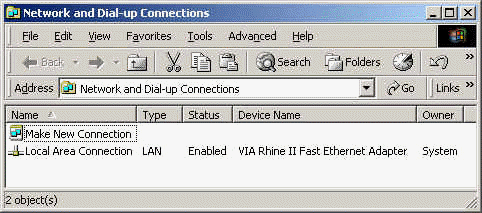
Launch the "Network" control panel from "Start / Settings / Network
and Dial-Up Connections".
2 Network Components
| Select the "Local Area Connection"
in the Network frame. |
 |
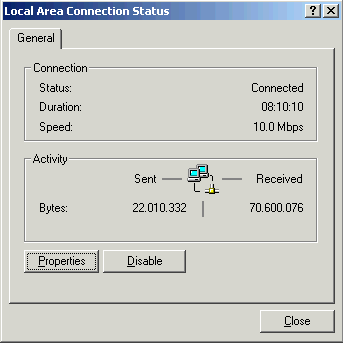
| Click the "Properties" button to
display the local area network stack list. |
|
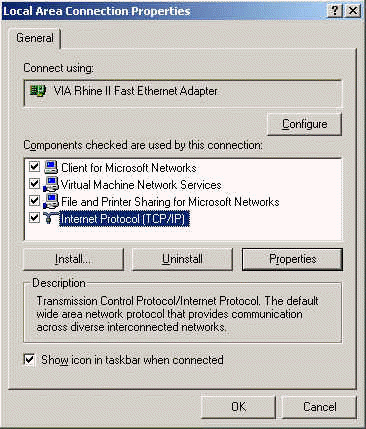
| TCP/IP
Select TCP/IP on the list, then click on
"Properties" to check the address (you need to know the
Host address when connecting the terminal stations to the server).
Follow step 3. |
|
3 Configuring TCP/IP
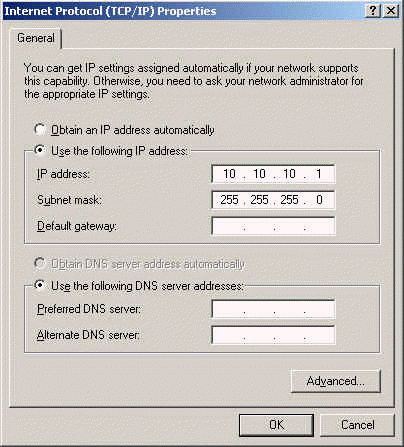
| Check or input the IP address of the computer. The Server must have a static IP address
to allow the terminals to
connect to it. Click on "OK". |
 |