Softogo.Print – User’s manual
Softogo.Print – User’s manual.htm
Use of Softogo.Print
Declaration
To declare the Softogo.Print object in an
HTML page, the following line of code should be included in its body.
<OBJECT
ID="PrintObj"
CLASSID="CLSID:5C93AC05-C238-49C1-8CB4-E9D8A9FA242C">
</OBJECT>
Methods
The object includes the following methods.
AddData (“Add data to the buffer.”)
AddLine (“Add a line, data + end-line, to
the buffer.”)
Print (copies)
Clear ()
PrintFromFile (“\\print\\filetoprint.txt”,
copies)
GetLastError()
GetLastErrorDes()
AddData (“Add data to the buffer.”)
Add text to the buffer without a new
line character. You may use the “\n” escape sequence, in between or at the end
of the text, to indicate an end of line.
Examples:
|
Command
|
Output
|
|
AddData (“Data1”)
|
Data1¬
|
|
AddData (“Data1\n”)
|
Data1¿
¬
|
|
AddData (“Data1\nData2”)
|
Data1¿
Data2¬
|
|
AddData (“Data1\nData2\n”)
|
Data1¿
Data2¿
¬
|
AddLine (“Add a line, data + end-line, to the buffer.”)
Add text to the buffer with a new
line character. You may use the “\n” escape sequence, in between or at the end
of the text, to indicate new lines.
Examples:
|
Command
|
Output
|
|
AddLine (“Data1”)
|
Data1¿
¬
|
|
AddLine (“Data1\nData2”)
|
Data1¿
Data2¿
¬
|
Print (copies)
Print the buffer the number of times
indicated with the copies parameter.
Clear ()
Clear buffer.
PrintFromFile (“\\print\\filetoprint.txt”, copies)
Print the file the number of times
indicated with the copies parameter.
GetLastError()
Returns the code for the last error
occurred. Zero means that the last operation returned no error.
GetLastErrorDes()
Returns a description of the last error
occurred. An empty string means that the last operation returned no error.
Communications port configuration
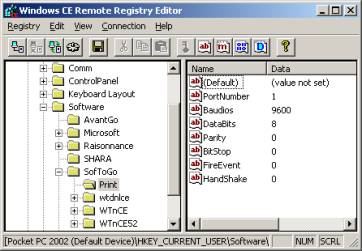
The Softogo.Print object initializes the
communication through the serial port, using the following information taken
from the Pocket PC’s registry.
|
HKEY_CURRENT_USER
Software
Softogo
Print
PortNumber = “1”
Baudios = “9600”
DataBits = “8”
BitStop
= “0”
Parity = “0”
FireEvent = “0”
HandShake = “0”
|
|
PortNumber
The port number for the port to be used
during the communication. E.g. 1.
Baudios
The baud rate for the communication. Valid values
are the ones indicated bellow.
HandShake
Internal communications protocol used for
transferring data at hardware level.
|
0
|
None
|
|
1
|
Hardware
|
|
2
|
Software
|
DataBits
Number of transferred bits. Valid values
are 7 and 8.
Parity
This states the parity type. Valid values
are as follows.
|
0
|
None
|
|
1
|
Odd
|
|
2
|
Even
|
|
3
|
Mark
|
|
4
|
Space
|
BitStop
Number of stop bits.
|
0
|
1 bit
|
|
1
|
1.5 bits
|
|
2
|
2 bits
|
FireEvent
Action followed in case an error occurs.
|
1
|
Triggers an event. Doesn’t retry
operation.
|
|
0
|
Shows an error message, and allows to
retry.
|
Complete examples
Simple print
The following example prints three lines in
a row when the Print button is pressed.
<HTML>
<HEAD>
<TITLE>ATL
3.0 test page for object Print</TITLE>
</HEAD>
<SCRIPT
ID=clientEventHandlersJS LANGUAGE=javascript>
function
Print()
{
PrintObj.AddData("Text
1 on line 1\nText 2 on line 2\n");
PrintObj.AddLine("Text
3 on line 3");
PrintObj.Print(1);
PrintObj.Clear();
}
</SCRIPT>
<BODY>
<OBJECT
ID="PrintObj"
CLASSID="CLSID:5C93AC05-C238-49C1-8CB4-E9D8A9FA242C">
</OBJECT>
<input
type="button" onclick="Print()"
value="Print"
id=button1 name=button1>
</BODY>
</HTML>
Simple printing from file
The following example prints 2 copies of
the text.txt file found in the toprint directory.
<HTML>
<HEAD>
<TITLE>ATL
3.0 test page for object Print</TITLE>
</HEAD>
<SCRIPT
ID=clientEventHandlersJS LANGUAGE=javascript>
function
Print()
{
PrintObj.PrintFromFile("\\toprint\\text.txt",
2);
}
</SCRIPT>
<BODY>
<OBJECT
ID="PrintObj"
CLASSID="CLSID:5C93AC05-C238-49C1-8CB4-E9D8A9FA242C">
</OBJECT>
<input
type="button" onclick="Print()"
value="Print"
id=button1 name=button1>
</BODY>
</HTML>
Capturing an event when an error occurs
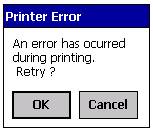
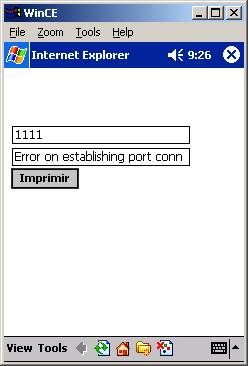
To generate a known error, we ask ActiveX
to print when the port is not available. We also state in the registry that, if
an error were to occur, an event should be triggered. This is made with the
FireEvent parameter set to “1”.
When the error occurs, ActiveX triggers the
PrintError event, which is captured by the script included under the PintObj
object declaration.
This script shows the error code and its
description.
<HTML>
<HEAD>
<TITLE>ATL
3.0 test page for object Print</TITLE>
</HEAD>
<SCRIPT
ID=clientEventHandlersJS LANGUAGE=javascript>
function
Print()
{
PrintObj.PrintFromFile("\\toprint\\text.txt",
1);
}
</SCRIPT>
<BODY>
<OBJECT
ID="PrintObj"
CLASSID="CLSID:5C93AC05-C238-49C1-8CB4-E9D8A9FA242C">
</OBJECT>
<SCRIPT
FOR="PrintObj" EVENT="PrintError">
text1.value = PrintObj.GetLastError();
text2.value = PrintObj.GetLastErrorDes();
</SCRIPT>
<P>
<INPUT id=text1 name=text1 value=""> </P>
<P>
<INPUT id=text2 name=text2 value=""> </P>
<input
type="button"
onclick="Print()"
value="Print" id=button1 name=button1>
</BODY>
</HTML>
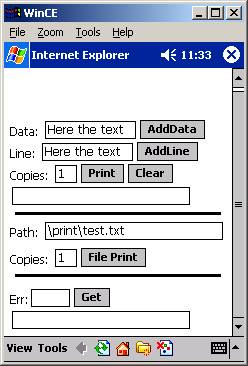
Complete example
The following example shows how ActiveX
works.
<HTML>
<HEAD>
<TITLE> SofToGo.Print </TITLE>
</HEAD>
<SCRIPT
ID=clientEventHandlersJS LANGUAGE=javascript>
function
AddData()
{
PrintObj.AddData(txtData.value);
txtRes.value
= "AddData OK"
}
function
AddLine()
{
PrintObj.AddLine(txtLine.value);
txtRes.value
= "AddLine OK"
}
function
Print()
{
PrintObj.Print(txtPCop.value);
txtRes.value
= "Print OK"
}
function
Clear()
{
PrintObj.Clear();
txtRes.value
= "Clear OK"
}
function
GetError()
{
txtErr.value
= PrintObj.GetLastError();
txtErrD.value
= PrintObj.GetLastErrorDes();
}
function
PrintFromFile()
{
PrintObj.PrintFromFile(txtPath.value,
txtFCop.value);
}
</SCRIPT>
<BODY>
<OBJECT
ID="PrintObj"
CLASSID="CLSID:5C93AC05-C238-49C1-8CB4-E9D8A9FA242C">
</OBJECT>
<SCRIPT
FOR="PrintObj" EVENT="PrintError">
GetError()
</SCRIPT>
<P>
Data: <INPUT id=txtData name=txtData
size=10 value="Here the text">
<INPUT type="button"
onclick="AddData()" value="AddData" >
</P>
<P>
Line: <INPUT id=txtLine name=txtLine
size=10 value="Here the text">
<INPUT type="button"
onclick="AddLine()" value="AddLine" >
</P>
<P>
Copies: <INPUT id=txtPCop name=txtPCop
size=2 value="1">
<INPUT type="button"
onclick="Print()" value="Print">
<INPUT type="button"
onclick="Clear()" value="Clear" >
</P>
<P>
<INPUT id=txtRes name=txtRes
value="">
</P>
<HR>
<P>
Path: <INPUT id=txtPath name=txtPath
value="\print\test.txt">
<P>
</P>
Copies: <INPUT id=txtFCop name=txtFCop
size=2 value="1">
<INPUT type="button"
onclick="PrintFromFile()" value="File Print">
</P>
<HR>
<P>
Err:<INPUT id=txtErr name=txtErr size=4
value="">
<INPUT type="button"
onclick="GetError()" value="Get">
<INPUT id=txtErrD name=txtErrD
value="">
<P>
</BODY>
</HTML>